Archive for the ‘IGEL’ Category

Tip: IGEL UMS is not able to detect system proxy to fetch firmwareupdates for the Universal Firmware Update feature

Tuesday, October 2nd, 2012

Hello,

sometimes it can happen (UMS Version 4.01.500 or higher) that the UMS Server did not detect the System Proxy for the Universal Firmware Update Feature. If this happens you are not able to download Firmware’s thru the UMS Console from the IGEL download Server and you have to download the Firmware by your own.

To fix this open a DOS console and execute “C:\Program Files\IGEL\RemoteManager\rmguiserver\bin\tomcat5w.exe //ES//IGELRMGUIServer”

Open the JAVA Tab and make sure that the following entry exists in the field “Java Options”: -Djava.net.useSystemProxies=true

If this entry exist and it still doesn’t work, remove the entry and add the following Options:

-Dhttp.proxyHost=your_Proxyhost

-Dhttp.proxyPort=your_Proxyport

If your Proxyserver require an authentication add also:

-Dhttp.proxyUser=your_UserName
-Dhttp.proxyPassword=your_Password

This should fix the issue, of course without any warranty and test this first!

Cheers
Michael

Fix jumping Mousepointer for Citrix Receiver (Linux)

Monday, October 1st, 2012

Hello,

do you have dislocated offices and users reporting a jumping or flickering mouse pointer? From my expierence this is a bandwith/latency issue that should be investigated at all.

To fix or improve this for the Linux Version of the Citrix Receiver in an IGEL Firmware try:

System->Registry and then ica.wfclient.mousetimer=0, ica.wfclient.pointerclicktime=10 and ica.wfclient.pointergrabtime=10. All settings needs to be modified, test this with one device/user first before apply these modification to a bunch of clients.

Windows versions of the Receiver do not show this effect in general, they are just slower in this scenario.

Cheers

Michael

New IGEL Universal Management Suite Version 4.02.200

Monday, October 1st, 2012

Hello Folks,

there is a new IGEL UMS Version available at www.myigel.com
IGEL Universal Management Suite
=================================
Version 4.02.200
Release date: 24.09.2012

===============================
Notes:
===============================

Version 4.02.200 did a full QA run of version 4.02.110 and contains
few additional bugfixes.

The linux installers are tested with
– Ubuntu 8.04 (32bit)
– Ubuntu 10.04 (32bit)
– RedHat Enterprise Linux 6 (32bit)

For further compatibility information check the Universal Management Suite
Data Sheet at www.igel.com.

==================================
New features
=================================

– [Universal Customization Builder] Partial update folder deployment
available (in extension to file deployment)

================================
Fixed bugs
================================

– [AD / LDAP integration] Job update fails with ‘Access denied’ error message
for AD users.
– [Database backup] DB backups from UMS 4.01.500 cannot be restored in
version 4.02.100 (Error: ‘Failed to start database with class loader
sun.misc.Launcher…’).

==================================
Previous versions
==================================

**********************************************
UMS 4.02.110
*********************************************

=====================================
Notes:
=====================================

This is an untested internal release only!

=====================================
New features
=====================================

– Update Java Runtime Environment to version 1.6u33
This java version contains bug fixes related to kerberos logon and should
fix issues with UMS AD integration.

===============================
Fixed bugs
===============================

– [AD / LDAP integration]
– global permissions were not set correctly, when an
AD User which has been imported by an AD group is logged in.
– Consider active directory browse user (if defined) in kerberos login
process to resolve group memberships.
– AD search fails if you log on with the domain administrator account
(error message ‘Login failed’ followed by a user credential dialog).
– [console common] Creating a new UMS administrative group fails.
– [console: license handling] Performance enhancements issueing UDC licenses
from smart card
– [server common]
– UMS Server looses database connection if database is offline for a short
while
– ‘ORA-01000: Maximum open cursors exceeded’ error with Oracle DB
– server startup failed when the username and the schemaname
differs (SQL Server only).
– [server: webdav] Permissions to folder for a user in Snapshot Management
does not propagate to items inside the folder.
– [UMS Administrator application] The UMS Administrator application does not
start without access to the internet.

Cheers

Michael
blog.cloud-client.info toolbar for Firefox and Internet Explorer

Sunday, September 30th, 2012

Hi,

want to get the latest news, try our new toolbar for Internet Explorer and Firefox powered by Alexa. Feedback is welcome! The download is available in the right menu of the blog.cloud-client.info website.

Cheers
Michael

Tip: Optimizing Audio quality for RDP connections for IGEL Universal Desktop LX/OS

Friday, September 28th, 2012

Hi,

this hint is only for RDP connections between a IGEL Universal Desktop LX / OS and a Windows based Remote Desktop Server (for example Windows 2008 R2 SP1, not Remote FX) and if you got a bad audio quality (noisy/cropped). It can be used with different firmware versions, in my case i used the 4.10.100.

Open the IGEL Setup and/or the profile and go to System->Registry->rdp->winconnect->sound-driver and change it to OSS.

Apply the settings and restart the session to the Server, the result should be much better now.

Cheers

Michael

Running Windows 8 to go on a IGEL UD5 Hardware (incl. WiFi Add-On Food)

Friday, September 28th, 2012

Hello Folks,

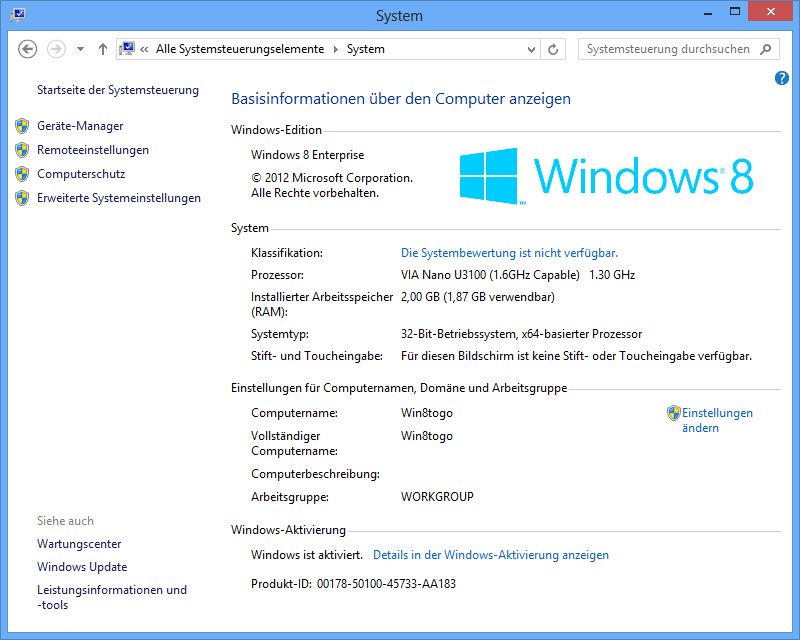
today i’ve tested Windows 8 to go together with an IGEL UD5 incl. the optional WiFi Add-On Food and here are the results.

Requirements:
– IGEL UD5 with min 2GB of RAM (Windows 8 to go requirement)
– A USB Storage that can run Windows 8 to go and of course it should be installed
– In the UD5 BIOS (DEL after power on the Client) you need to enable to boot from a USB device

My Setup:
– A UD5 (VIA Nano based), 2GB RAM coming with the optional WiFi Food (BIOS Setup to provide 128MB Video RAM)
– one 750 GB USB 3.0 HDD running Windows 8 to go (x86 Version) incl. enabled Bitlocker drive encryption for the HDD.
– Installed Software: Office 2010, System Center 2012 Endpoint Protection, KL Codec pack, Evince PDF Viewer and Citrix Receiver
– Enabled Windows 8 Features: Nearly everything available with Windows 8 x86 Version

windows8togoud5.jpg

Results:
– System is booting fine, incl. hardware setup i was able to get/work with the desktop in round about 1:30min (please note: this results can vary depending on your USB Memory Speed)
– Available max. Resolution: 2560×1440
– Supported Hardware: Nearly every needed driver incl. the optional WiFi Food is coming with Windows 8 to go without the audio driver. Regarding VIA the audio driver is currently under development and will be available soon.
– No issues if using Bitlocker Drive encryption coming with Windows 8 to go.

Disadvantage:
– Of course the System can not be managed by the IGEL UMS in any kind when running Windows 8 to go
– You might be required to increase the RAM if you are not already using a Windows 7 based UD5, i tested it also with 1 GByte RAM and it works for me too but it’s a little bit slower and 2GByte of RAM is the Microsoft defined requirement to use Windows 8.
– Currently no audio driver from VIA is available (also not thru Windows update)
– I don’t recommend to use a UD2 for this, a UD3 might provide enough perfomance but i would prefer a UD5 in any way…. I will check out a UD9 later incl. touch Screen but i suggest this combination will work too.
– Not official supported by IGEL Technology

Advantage:
– Very simple way to switch from a full managed to a none managed Windows based desktop without touching the original IGEL OS.

Use case:
– Mobile workers using Windows 8 to go can use a thin client as “fast to setup” workplace.
– Guest workers can get a seperate full Windows workplace that is not attached to your environment in only a few minutes.
– Lab environments to check/create Windows 8 to go based desktops/medias or need to switch the OS very fast to access or test other systems in the environment.

Cheers

Michael

IGEL @ Citrix Synergy

Wednesday, September 26th, 2012

Hi,

Citrix Synergy 2012

if you want to win one of 10 brand new UD2 Multimedia devices, you should visit the IGEL booth @ the Citrix Synergy.

The Citrix Synergy is from October 17-19 in Barcelona.

Cheers

Michael

New UMS Template Version 1.0.30 for IGEL Universal Management Suite 4.02.100 available

Tuesday, September 25th, 2012

Hello Folks,

here you can download a new Version of the Cloud-Client.Info template for the IGEL Universal Management Suite 4.02.100: http://www.cloud-client.info/umstemplate/umstemplate1030.rar

The template is also available on papershare: http://www.papershare.com/app/paper.aspx?id=1791&o=3736

Changelog:

1.0.30
——
– Support for IGEL Universal Desktop LX (x86) Firmware 4.10.100
– Support for IGEL Universal Desktop ES (W7) Firmware 3.03.100
– Added 2X configuration’s for IGEL Universal Desktop LX / OS
– Added printer configuration sample for IGEL Unversal Desktop ES / ES W7
– Added Bluetooth and PCMCIA configuration (enable/disable) for IGEL Universal Desktop ES W7
– Added Profile to enable VMWare View USB redirection service for IGEL Universal Desktop ES / ES W7
– Added Profiles to configure the IGEL error log level for IGEL Universal Desktop ES / ES W7
– Added Profiles to configure VMWare View smart card support for IGEL Universal Desktop LX / OS
– Updated Profile to disable ICA render extensions for IGEL Universal Desktop LX / OS
– Added Profiles to configure application groups/folder used by Citrix PNA for IGEL Universal Desktop LX / OS
– Added Profile to enable HDX Realtime Optimization Pack for IGEL Universal Desktop LX / OS
– Updated Profile for Citrix HDX Realtime Webcam redirection incl a new optimized profile for Microsoft WebCams for IGEL Universal Desktop LX / OS
– Added Profiles for CUPS configuration (Use Kerberos Login / USB Slow Down) for IGEL Universal Desktop LX / OS
– Added Profile for 802.1x Authentication configuration for the onboard network card for IGEL Unversal Desktop LX / OS
– Added Profile for 802.1x Authentication to allow connections to not secured networks for IGEL Universal Desktop LX / OS
– Added Profile for automatic standby configuration for IGEL Universal Desktop LX / OS
– Removed old firmwares
– Profiles Total 417

The old download links are obsolete now.

Have Fun

Michael

New available solution: 2X Application Server XG support for IGEL Universal Desktop / OS LX

Monday, September 24th, 2012

Hello,

2X Application Server XG

like mentioned in this press release (http://www.igel.com/company/press-media/press-releases/single-view/article/an-economical-private-cloud-with-igel-and-2x.html), IGEL is now supporting the 2X Application Server XG solution. If you want to use this solution, you have to get the Advanced Feature Set license for your Client. If you want to get some more information’s about 2x, get a look here: http://www.2x.com/

So we have another available solution here… If i got some time, i will report a test here.

Cheers

Michael

Successfull migrated: Hewlett-Packard t510 thin client

Monday, September 24th, 2012

Hello folks,

HP t510

 today i migrated a HP t510 (VIA Eden X2 U4200 CPU) thin client with the IGEL Universal Desktop OS (UDC) 4.10.100. The hardware support includes the graphic card (VIA Chrome 9; fully supported but not official by IGEL) and are working perfectly for me incl. network card, USB ports and audio.

Of course i will not give a written guarentee and you have to test this by your own too! 😉

Have fun

Michael

P.S.: Image Source Hardware Zone Philippines

USB Redirection and five things you should be aware….

Tuesday, September 18th, 2012

Hello folks,

very often users blame that “real” USB redirection doesn’t work well and they´re running in serveral issues. Some reasons why…

USB

1) USB Speed: If you are not using a zero client with a USB 1.1 port (i call it speed limitation on hardware level), the most important thing is “speed”. Don´t try to redirect a device that require 36mbit/s / 4,5mbit/s (Blue Ray Burner single speed) thru a 2mbit WAN connection… It will not work stable.

2) Voltage: If using an old USB Harddisk, use the right cable (Y-cable if needed) and make sure that the USB port can deliver the required voltage or use an active USB Hub with a seperate power supply. If you’re using a thin client which is a low voltage device, check this out first! Also do not use USB christmas gimmicks or USB coffee cup heater together with a thin client or any other low voltage device (tablet computer/netbook). Low voltage devices in general don’t provide a 450w power supply which is able to compensate this..

3) USB devices mostly require a “stable” network connection to be redirected, if this is not available.. Be prepared to have some fun with the users!

4) A USB device which is redirected to a virtual desktop or somewhere else can not be used with the local OS, this applies especially for keyboards, USB network devices and similar. Redirecting a USB WiFi device is a bad idea if you´re using this device also for the local network connection (connections loss after connection to the VM is established), redirecting a keyboard is a bad idea if you want to use it local (alt+ctrl+del as sample will be processed only in the VM and not at the end user device).

5) For IGEL devices: Enabling USB redirection in general will not redirect all connected usb devices, you have to allow it seperatly by class or device id to prevent issues mentioned in 4).

Cheers

Michael

P.S.: A small extension… Try to use “real” USB redirection only if you’re really need it! Very often there are more effective ways to use a USB device in a remote session thru virtual protocol channels like for audio devices, memory sticks, printers or smart card readers.

Improve LX/OS performance for ICA sessions

Tuesday, September 18th, 2012

Hello Folks,

here are some settings that can improve the User experience for ICA sessions, mostly this is important for smaller devices like the old UD2 or UDC migrated old devices.

All settings can be found in system->registry, please test the settings one by one and not all at the same time! Use on your own risk! Test in advance!

General:

x.xserver0.backingstore: activate
x.xserver0.backingstorepolicy: WhenMapped

ICA related:

x.xserver0.backingstorepolicy
ica.wfclient.enableoss
ica.wfclient.twredundantimageitems (300 or 1000)
ica.wfclient.useserverredraw

Speedscreen:
ica.wfclient.speedscreenbacompressedcachesize: 1024 or 4096
ica.wfclient.speedscreenbacompressionenabled
ica.wfclient.speedscreenbadecompressedcachesize: 4096
ica.wfclient.speedscreenbamaximumcompressionlevel: low
ica.wfclient.speedscreenmmasecondstobuffer: 5

Please note: This might improve the user experience but it don’t have to be, depending on the user scenario/environment!

Cheers
Michael

Successfull migrated with IGEL UDC: Dell Optiplex GX620

Tuesday, September 11th, 2012

Hello,

today we migrated a Dell Optiplex GX620 with the IGEL Universal Desktop OS Version 4.10.100. The inbuild hardware like the Intel 945G GFX Card and the NetXtreme BCM 5751 network card work’s like a charm (please note: You need the advanced feature set to enable native Graphic Card driver support!).

Cheers

Michael

New Firmware: IGEL Unversal Desktop ES 2.12.10x

Tuesday, September 4th, 2012

IGEL Universal Desktop ES
=========================
Version 2.12.100
30. August 2012
Supported devices: UD2-x20 ES, UD3-x20 ES, UD5-x20 ES, UD7-x20 ES

=====================================
Notes:
=====================================

=====================================
Drivers:
=====================================
– OmniKey Cardman 3×21: 1.1.0.32
– Realtek RTL8167: 5.663.1212.2006
– Realtek RTL8139: 5.398.613.2003
– VIA Rhine II: 3.72.0.457
– VIA WLAN VT6656: 1.69.0.1000
– VIA Vinyl AC97: 6.14.01.4180
– RaLink RT73 USB: 1.00.04.0000
– VIA HD Audio VT1708B: 6.0.1.10400
– VIA CN896: 6.14.10.0.137
– VIA CN700 (Rotation): 6.14.10.0395
– Matrox Millenium P690: 2.6.1.6
– VIA VX855: 6.14.10.0.222
– VIA MSP I/O APIC: 6.0.00.0300
– RaLink RT 2500 USB: 2.01.01.0000
– RaLink RT2500 PCI: 3.02.00.0000
– RaLink RT61 PCI: 1.02.02.0000
– DLink DWA 131: 1084.12.0805.2009
– Intel Centrino WLAN N-1000: 15.1.0.18
– AMD PCnet Family: 4.38.0.0
– 3COM 3CR990 Fibre: 3.00.00.0023
– 3COM 3C900B-FL: 4.5.0.0
– Prolific PL-2303 USBtoSerial: 2.0.2.8
– FTDI UsbToSerial: 2.02.04

==========================================
Applications:
==========================================
– .NET: 3.5 Sp1
– Ericom PowerTerm: 9.0.1.203
– Ericom WebConnect: 5.6.1.1000
– Sun JAVA RE: 1.6 Update 18
– VMWare View Version: 5.1.0 build-704644
– Fabulatech USB for Remote Desktop: 3.1.3
– Tight VNC Server: 1.3.10
– Citrix PM Agent: 4.5.124
– Adobe Acrobat Reader: 5.0
– SAP GUI JAVA for Windows: 7.10 R 7
– Leostream Connect Client: 2.7.129.0
– NXClient: 3.4.0.7
– Thin Print: 7.0
– Citrix Receiver: 3.3
– Quest vWorkspace Client: 7.2
– Ekiga VOIP Client: 3.2.6
– MS RDP Client: 7.0
– NCP Enterprise Client: 9.30
– Client for RedHat RHEV-D: 3.0-26
– USB Redirection for RedHat RHEV-D: 3.0-26
– Internet Explorer: 8
– Windows Media Player: 11

==============================================
New features:
==============================================
– [NCP]:
– NCP Client is disabled by default and will by activated
if it is configured via the IGEL Setup.
– [Citrix]:
– Citrix Receiver updated to version 3.3
– Usage of local video buffer is configurable via
IGEL registry parameter(ica.module.wfclient.forcelvbmode).
– [View]:
– Updated VMWare View version to 5.1.0. The USB redirection is
disabled by default and can be activated with the IGEL Setup
(Accessories->Windows Services).
– [System]:
– Added configuration of IGEL error log level in IGEL registry
(system.logging.loglevel).
– Latest updates/hotfixes added
– Bluetooth support

================================================
Bug fixes:
================================================
– [System]:
– Settings from UMS should only be applied to the Thin Client
if all local made settings are written to the UMS.
– Fixed problems with backup/restore of TS CALs.
– Fixed universal firmware update to work with UMS 4.2.100
and newer.

================================================
Known Issues:
================================================
– A device connected over WLAN cannot be scanned by UMS if the first
ethernet adapter is disabled in device manager.
– UMS-Agent BOOT commands:
* Get settings from UMS over WLAN fails at boot time
* Re-Registration of client after firmware update over WLAN
fails at boot time
-[FABULATCH]: Fabulatech USB for Remote Desktop is currently
not working with XenDesktop.

Citrix Synergy in Barcelona

Monday, September 3rd, 2012

Hi,

this year i will travel to the Citrix Synergy in Barcelona (http://www.citrixsynergy.com/barcelona/index.html), if someone want’s to talk about virtualization and thin clients (or drink a beer); just give me a small mail. 😉

Cheers
Michael

Update: IGEL Hardware Whitepaper

Monday, September 3rd, 2012

Hello Folks,

i just updated the IGEL Hardware overview whitepaper, the download is available here: http://www.papershare.com/app/paper.aspx?id=2538&o=3736 and here: http://www.cloud-client.info/whitepaper/

Cheers
Michael

Windows 8 final and IGEL LX/OS Version 4.10.100 thru RemoteFX

Friday, August 31st, 2012

Hello Folks,

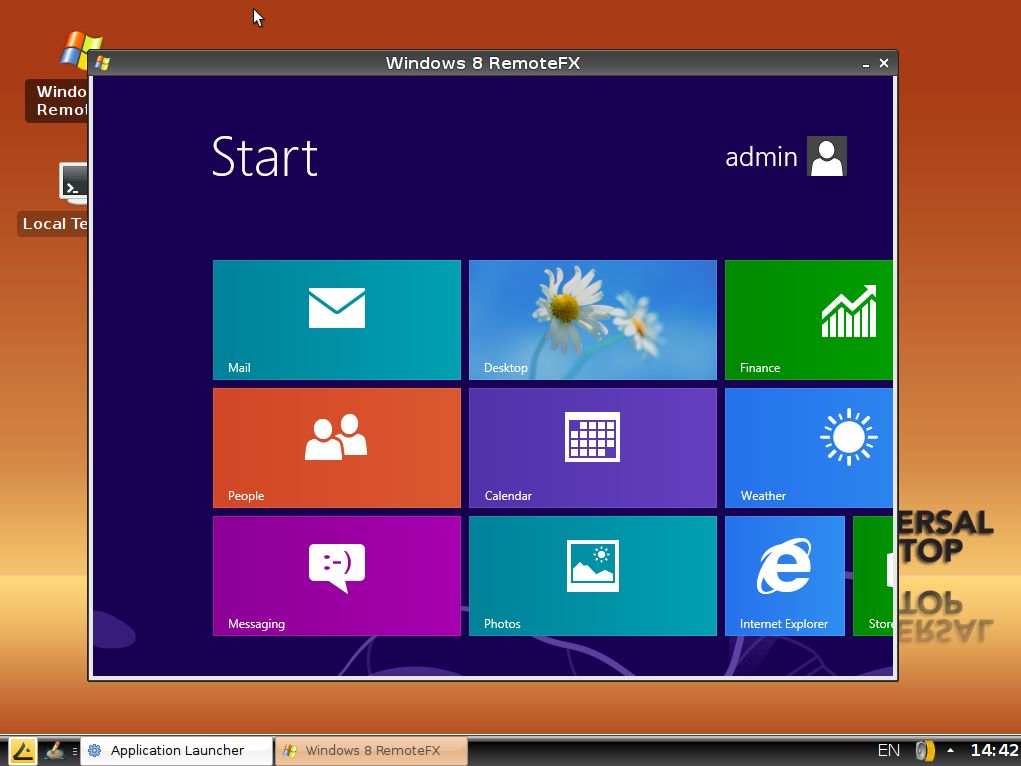
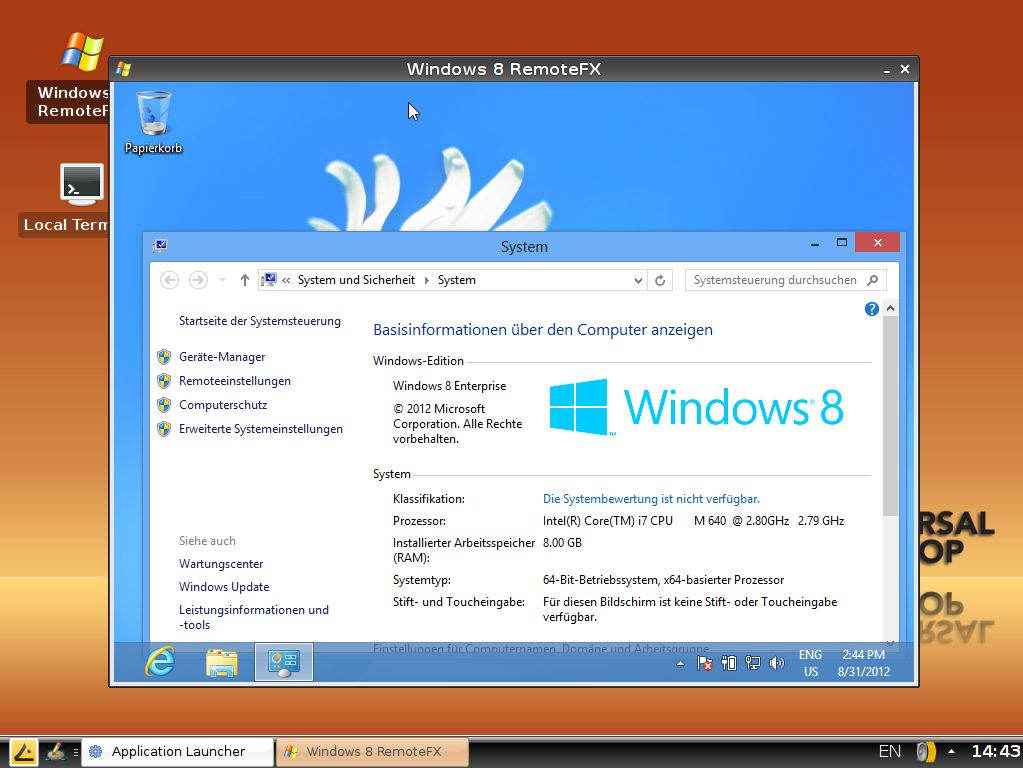
today i’ve tested the fresh Windows 8 Enterprise final version together with the IGEL LX/OS Version 4.10.100 thru an RemoteFX connection.

It works perfect for me and i was not able to find any issue at the moment, so i can recommend this solution.

Windows 8 Start Menu thru IGEL Linux RemoteFX sessionWindows 8 desktop using Aero thru IGEL Linux RemoteFX session

Click on the screenshots to expand, as you can see i’ve used a window based session but it works fine with a fullscreen session too.

Iam looking forward to the Windows Server 2012 final release and to check out how this works… 😉

Cheers
Michael

Firmware Release: IGEL Universal Desktop LX (BETA) 1.02.100 for the ARM based IGEL UD2-LX Multimedia

Tuesday, August 14th, 2012

Important: This Firmware is only available for IGEL Customers with a IGEL UD2-LX Multimedia trial device, please contact IGEL to receive the download Link if you not receive this already thru a seperate technical newsletter.

IGEL Universal Desktop LX (BETA)
================================
Version 1.02.100
Aug 09 2012
Supported devices: UD2-LX MultiMedia

=============================================================================
Notes:
=============================================================================

Versions
========
– Citrix ICA Client 12.2.3.213446
– RDP rdesktop 1.6.0
– VMware View client 1.5.1-739969
– Leostream Java Connect 2.3.47.0
– Firefox 14.0.1
– Xorg X11 Server 1.10.4
– Xorg Xephyr 1.10.4
– PC/SC Lite 1.8.1
– MUSCLE CCID Driver 1.4.5

=============================================================================
New features:
=============================================================================
– [ICA]
– New ICA Client version 12.2.3.213446
– Citrix XenApp/Program Neighborhood:
– Use High Color Icons.
– Grouped applications on the desktop can be enabled by IGEL Setup ->
Sessions -> ICA -> Citrix XenApp -> Appearance ->
“Keep folder structure on desktop”
(registry key: ica.pnlogin.desktop_folder_structure)
Additional configuration:
registry key ica.pnlogin.desktop_folder_farm : show farm icons on desktop
registry key ica.pnlogin.appfolder_apps_name : the main directory name
for all Citrix XenApp sessions in file browser.

– [Browser] Updated Firefox browser to version 14.0.1

– [Leostream]
Updated to version 2.3.47.0 of the Leostream Connect Java Client
(without support for Leostream USB redirection).

– [Desktop]
– Reworked font configuration: added new “Liberation” true type font.
– Possibility to set the XV color key by registry key x.xserver0.colorkey.
– Increased Video RAM to 128MB

– [base system]
– Integrated latest OMX Framework. Now it’s possible to run applications
which are using the DSP acceleration concurrently.
– Added Greek keyboard layout.
– Added Russian keyboard layout.
– Updated French and Dutch translations.
– Updated IGEL Setup to version 4.2.3.

=============================================================================
Fixed bugs:
=============================================================================
– [ICA]
– Enhanced Multimedia Redirection stability
– Fixed dual view sessions with up to 1920×1200 resolution on each monitor.
– Fixed graphics corruptions when DSP Acceleration is enabled.

– [Misc]
– RDP sessions, RDP based VMWare View sessions and View appliance mode/RDP sessions
now display a message when TCP connection is lost and terminate themselves
after a timeout interval.
registry key for RDP session: sessions.winconnect%.option.connection-timeout
registry key for RDP based View session: sessions.vdm_client%.options.rrdp.connection-timeout
registry key for RDP based Appliance mode: vmwarevdmapp.rrdp.connection-timout

– [Desktop]
– Fixed Video playback with 2 x 1920×1200 resolution.
– Fixed VGA monitor support.

– [base system]
– Fixed stability of IGEL Setup.
Reduced system load during setup operation.

Back from Holiday

Monday, August 13th, 2012

Hello Folks,

i was in vacation the last two weeks and doesn’t got the time to work on all comments, sorry for the delay!

Cheers
Michael